<?xml version="1.0" encoding="utf-8"?>
<feed xmlns="http://www.w3.org/2005/Atom" xmlns:media="http://search.yahoo.com/mrss/">
    <title>Spatial Imaging</title>
    <link href="https://spatialimaging.dev/feed.xml" rel="self" />
    <link href="https://spatialimaging.dev" />
    <updated>2026-07-25T00:47:51+09:00</updated>
    <author>
        <name>Alaric Hamacher</name>
    </author>
    <id>https://spatialimaging.dev</id>

    <entry>
        <title>Old 3D Formats to Modern Workflows</title>
        <author>
            <name>Alaric Hamacher</name>
        </author>
        <link href="https://spatialimaging.dev/old-3d-formats-to-modern-workflows/"/>
        <id>https://spatialimaging.dev/old-3d-formats-to-modern-workflows/</id>
        <media:content url="https://spatialimaging.dev/media/posts/12/image1.png" medium="image" />
            <category term="tools"/>
            <category term="stereo3d"/>

        <updated>2026-07-24T22:59:15+09:00</updated>
            <summary type="html">
                <![CDATA[
                        <img src="https://spatialimaging.dev/media/posts/12/image1.png" alt="MVC2STEREO" />
                    mvc2stereo mvc2stereo is a macOS command-line tool for converting MVC stereoscopic 3D video into practical modern stereo formats. It was developed by Alaric Hamacher for real-world stereoscopic 3D production, restoration, archiving, and post-production workflows. The tool is designed for MVC-based 3D video sources that are&hellip;
                ]]>
            </summary>
        <content type="html">
            <![CDATA[
                    <p><img src="https://spatialimaging.dev/media/posts/12/image1.png" class="type:primaryImage" alt="MVC2STEREO" /></p>
                <h1 id="mvc2stereo">mvc2stereo</h1>
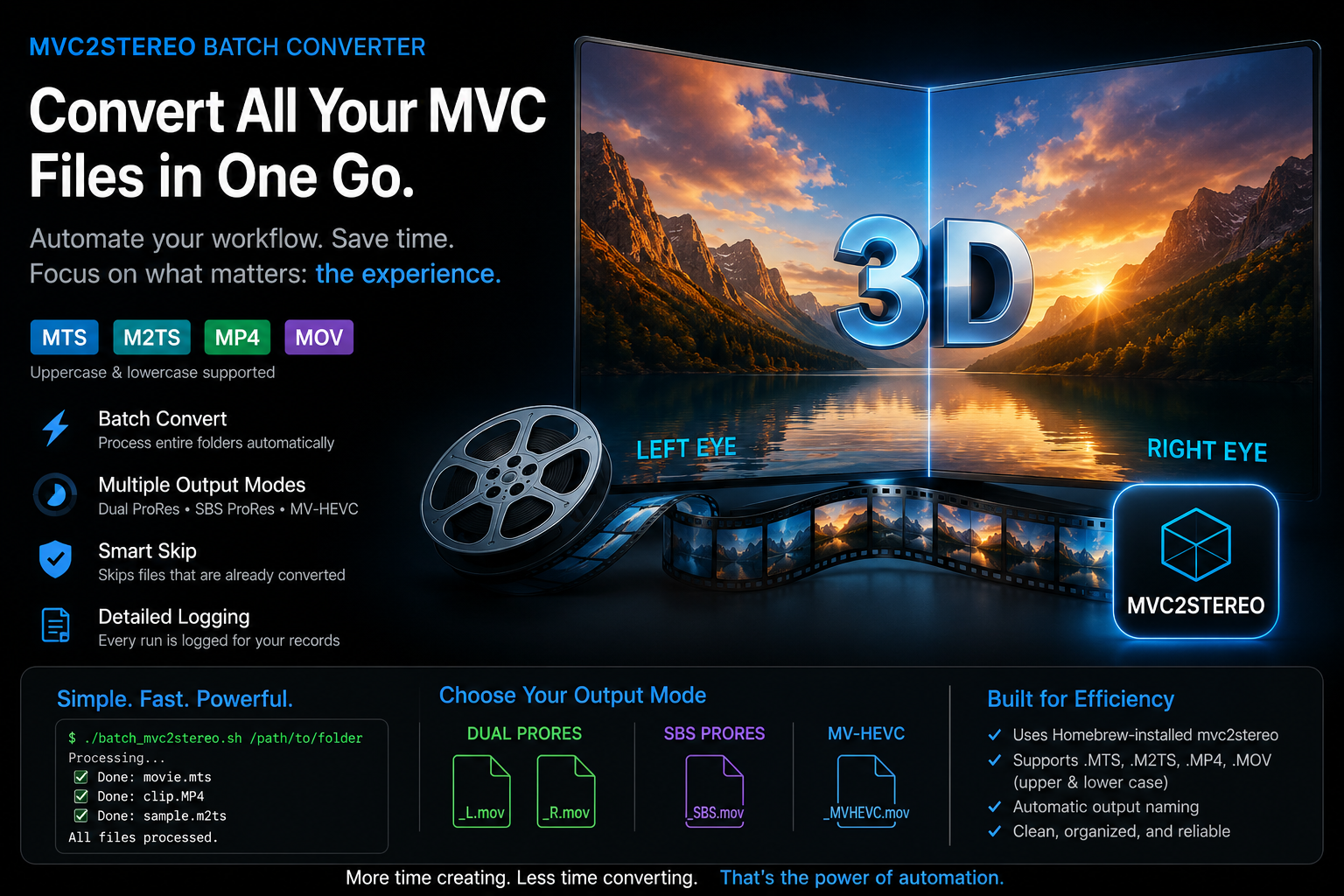
<p><code>mvc2stereo</code> is a macOS command-line tool for converting MVC stereoscopic 3D video into practical modern stereo formats.
It was developed by <strong>Alaric Hamacher</strong> for real-world stereoscopic 3D production, restoration, archiving, and post-production workflows.
The tool is designed for MVC-based 3D video sources that are difficult to use directly in current editing software.</p><img loading="lazy" src="images/image1.jpg" width="600" data-is-external-image="true">


<h2 id="table-of-contents">Table of Contents</h2>
<ul>
<li><a href="#purpose">Purpose</a></li>
<li><a href="#main-applications">Main Applications</a></li>
<li><a href="#supported-output-modes">Supported Output Modes</a><ul>
<li><a href="#side-by-side-prores">Side-by-Side ProRes</a></li>
<li><a href="#dual-prores">Dual ProRes</a></li>
<li><a href="#mv-hevc">MV-HEVC</a></li>
</ul>
</li>
<li><a href="#supported-input-formats">Supported Input Formats</a></li>
<li><a href="#installation">Installation</a></li>
<li><a href="#dependencies">Dependencies</a></li>
<li><a href="#basic-usage">Basic Usage</a></li>
<li><a href="#batch-conversion-script">Batch Conversion Script</a></li>
<li><a href="#audio-options">Audio Options</a></li>
<li><a href="#keeping-temporary-files">Keeping Temporary Files</a></li>
<li><a href="#example-workflows">Example Workflows</a><ul>
<li><a href="#convert-avchd-3d-footage-for-editing">Convert AVCHD 3D Footage for Editing</a></li>
<li><a href="#create-left-and-right-eye-master-files">Create Left and Right Eye Master Files</a></li>
<li><a href="#create-an-mv-hevc-stereo-movie">Create an MV-HEVC Stereo Movie</a></li>
<li><a href="#test-only-the-beginning-of-a-file">Test Only the Beginning of a File</a></li>
</ul>
</li>
<li><a href="#davinci-resolve-workflow">DaVinci Resolve Workflow</a></li>
<li><a href="#jvc-mvc-mp4--mov-support">JVC MVC MP4 / MOV Support</a></li>
<li><a href="#why-this-tool-exists">Why This Tool Exists</a></li>
<li><a href="#workshop-and-festival-use">Workshop and Festival Use</a></li>
<li><a href="#technical-notes">Technical Notes</a></li>
<li><a href="#current-limitations">Current Limitations</a></li>
<li><a href="#author">Author</a></li>
<li><a href="#third-party-code-notice">Third-Party Code Notice</a></li>
<li><a href="#license">License</a></li>
</ul>
<hr>
<hr>
<h2 id="purpose">Purpose</h2>
<p>Many older stereoscopic 3D cameras recorded video using <strong>MVC</strong> — <strong>Multiview Video Coding</strong>.
MVC is an extension of H.264/AVC. It stores:</p><ul>
<li>one full <strong>base view</strong></li>
<li>one dependent <strong>second view</strong>
This format was used in:</li>
<li>AVCHD 3D <code>.MTS</code> / <code>.M2TS</code> recordings</li>
<li>Blu-ray 3D video streams</li>
<li>some JVC MVC <code>.MP4</code> / <code>.MOV</code> camera files
Today, many applications can open these files but only show the base 2D view. The second stereo view is often ignored.
<code>mvc2stereo</code> converts both views into usable stereo video formats.</li>
</ul>
<hr>
<h2 id="main-applications">Main Applications</h2>
<p><code>mvc2stereo</code> can be used for:</p><ul>
<li>stereoscopic 3D post-production</li>
<li>editing MVC 3D footage in DaVinci Resolve</li>
<li>restoring older 3D camera recordings</li>
<li>archiving stereoscopic video material</li>
<li>creating side-by-side ProRes files</li>
<li>creating separate left/right ProRes masters</li>
<li>creating MV-HEVC stereo QuickTime movies</li>
<li>preparing stereo material for headset workflows</li>
<li>stereoscopic projection and screening</li>
<li>research and education in 3D filmmaking</li>
</ul>
<hr>
<h2 id="supported-output-modes">Supported Output Modes</h2>
<h3 id="side-by-side-prores">Side-by-Side ProRes</h3>
<p>Creates one ProRes movie with left and right eye images arranged side-by-side.</p><pre><code class="language-bash">mvc2stereo input.MTS --mode sbs-prores
</code></pre>
<p>Useful for:</p><ul>
<li>quick review</li>
<li>editing</li>
<li>3D monitoring</li>
<li>projection workflows</li>
<li>conversion to other stereo formats</li>
</ul>
<hr>
<h3 id="dual-prores">Dual ProRes</h3>
<p>Creates separate left-eye and right-eye ProRes movie files.</p><pre><code class="language-bash">mvc2stereo input.MTS --mode dual-prores
</code></pre>
<p>Useful for:</p><ul>
<li>high-quality stereo post-production</li>
<li>color correction</li>
<li>compositing</li>
<li>stereo alignment</li>
<li>archival mastering</li>
</ul>
<hr>
<h3 id="mv-hevc">MV-HEVC</h3>
<p>Creates a multilayer HEVC QuickTime movie.</p><pre><code class="language-bash">mvc2stereo input.MTS --mode mv-hevc
</code></pre>
<p>Useful for:</p><ul>
<li>Apple spatial video experiments</li>
<li>headset playback workflows</li>
<li>modern stereo delivery testing
Compatibility depends on the playback or editing software.</li>
</ul>
<hr>
<h2 id="supported-input-formats">Supported Input Formats</h2>
<p>Current input support:</p><ul>
<li><code>.MTS</code></li>
<li><code>.M2TS</code></li>
<li><code>.264</code></li>
<li><code>.h264</code></li>
<li><code>.avc</code></li>
<li>experimental JVC MVC <code>.MP4</code></li>
<li>experimental JVC MVC <code>.MOV</code>
The <code>.MTS</code> and <code>.M2TS</code> processing pipeline is implemented natively in Swift and does <strong>not</strong> require Python.</li>
</ul>
<hr>
<h2 id="installation">Installation</h2>
<h2 id="install-with-homebrew-bash-brew-tap-stereo3dtools-brew-install-stereo3dtoolsmvc2stereo--check-the-installation-bash-mvc2stereo---help">Install with Homebrew:
<code>bash brew tap stereo3d/tools brew install stereo3d/tools/mvc2stereo </code>
Check the installation:
<code>bash mvc2stereo --help </code></h2>
<h2 id="dependencies">Dependencies</h2>
<p>Homebrew installs the required FFmpeg dependency automatically.
<code>mvc2stereo</code> currently uses:</p><ul>
<li><code>ffprobe</code> for reading video information</li>
<li><code>ffmpeg</code> for audio muxing</li>
<li><code>ffmpeg</code> for experimental MP4/MOV MVC extraction
Python is <strong>not required</strong> for normal <code>.MTS</code> / <code>.M2TS</code> MVC processing.</li>
</ul>
<hr>
<h2 id="basic-usage">Basic Usage</h2>
<p>The examples below illustrate the three primary workflows supported by <code>mvc2stereo</code>.</p><h3 id="create-a-side-by-side-prores-movie">Create a Side-by-Side ProRes Movie</h3>
<p>The quickest way to preview or edit MVC footage is to create a single side-by-side ProRes movie.</p><pre><code class="language-bash">mvc2stereo Vacation3D.MTS --mode sbs-prores
</code></pre>
<p>Output:</p><pre><code class="language-text">Vacation3D_SBS.mov
</code></pre>
<p>Suitable for:</p><ul>
<li>DaVinci Resolve</li>
<li>Stereo review</li>
<li>3D projection</li>
<li>Quick conversions</li>
</ul>
<hr>
<h3 id="create-left-and-right-master-files">Create Left and Right Master Files</h3>
<p>For professional post-production, export each eye separately.</p><pre><code class="language-bash">mvc2stereo Vacation3D.MTS --mode dual-prores
</code></pre>
<p>Output:</p><pre><code class="language-text">Vacation3D_L.mov
Vacation3D_R.mov
</code></pre>
<p>Recommended for:</p><ul>
<li>Stereo alignment</li>
<li>Color grading</li>
<li>Visual effects</li>
<li>Archival masters</li>
</ul>
<hr>
<h3 id="create-an-mv-hevc-movie">Create an MV-HEVC Movie</h3>
<p>Generate a modern multiview HEVC QuickTime file.</p><pre><code class="language-bash">mvc2stereo Vacation3D.MTS --mode mv-hevc
</code></pre>
<p>Output:</p><pre><code class="language-text">Vacation3D_MVHEVC.mov
</code></pre>
<p>Suitable for:</p><ul>
<li>Apple Vision Pro</li>
<li>Spatial Video workflows</li>
<li>Immersive media experiments</li>
</ul>
<hr>
<h3 id="process-only-a-short-test-clip">Process Only a Short Test Clip</h3>
<p>When working with large recordings, convert only the first part of the file to verify compatibility.</p><pre><code class="language-bash">mvc2stereo Vacation3D.MTS \
    --mode dual-prores \
    --max-frames 100
</code></pre>
<hr>
<h3 id="keep-intermediate-files">Keep Intermediate Files</h3>
<p>During development or troubleshooting, intermediate MVC files can be preserved.</p><pre><code class="language-bash">mvc2stereo Vacation3D.MTS \
    --mode dual-prores \
    --keep-temp
</code></pre>
<h2 id="batch-conversion-script">Batch Conversion Script</h2>
<p>A simple batch script is provided for converting all supported MVC files inside one folder.</p><p>The script uses the Homebrew-installed <code>mvc2stereo</code> binary:</p><pre><code class="language-bash">TOOL=&quot;mvc2stereo&quot;
</code></pre>
<p>This means <code>mvc2stereo</code> must already be installed and available in the terminal:</p><pre><code class="language-bash">brew tap stereo3d/tools
brew install stereo3d/tools/mvc2stereo
</code></pre>
<p>Make the script executable:</p><pre><code class="language-bash">chmod +x batch_mvc2stereo.sh
</code></pre>
<p>Run it on a folder:</p><pre><code class="language-bash">./batch_mvc2stereo.sh /path/to/folder
</code></pre>
<p>If no folder is given, the current folder is used:</p><pre><code class="language-bash">./batch_mvc2stereo.sh
</code></pre>
<p>The script currently scans for the following file extensions, in upper and lower case:</p><pre><code class="language-text">.MTS
.mts
.M2TS
.m2ts
.MP4
.mp4
.MOV
.mov
</code></pre>
<p>The default output mode is:</p><pre><code class="language-bash">MODE=&quot;mv-hevc&quot;
</code></pre>
<p>You can edit the script and change this line to one of:</p><pre><code class="language-bash">MODE=&quot;dual-prores&quot;
MODE=&quot;sbs-prores&quot;
MODE=&quot;mv-hevc&quot;
</code></pre>
<p>The script automatically skips files when the expected output already exists.</p><p>Expected output names:</p><pre><code class="language-text">dual-prores  → input_L.mov and input_R.mov
sbs-prores   → input_SBS.mov
mv-hevc      → input_MVHEVC.mov
</code></pre>
<p>A log file is created automatically:</p><pre><code class="language-text">batch_YYYYMMDD_HHMMSS.log
</code></pre>
<p>Example:</p><pre><code class="language-bash">./batch_mvc2stereo.sh /Volumes/media/3D/my_folder
</code></pre>
<hr>
<h2 id="audio-options">Audio Options</h2>
<h2 id="by-default-audio-is-preserved-use-pcm-audio-bash-mvc2stereo-inputmts---mode-sbs-prores---audio-pcm--use-aac-audio-bash-mvc2stereo-inputmts---mode-sbs-prores---audio-aac--disable-audio-bash-mvc2stereo-inputmts---mode-sbs-prores---audio-none">By default, audio is preserved.
Use PCM audio:
<code>bash mvc2stereo input.MTS --mode sbs-prores --audio pcm </code>
Use AAC audio:
<code>bash mvc2stereo input.MTS --mode sbs-prores --audio aac </code>
Disable audio:
<code>bash mvc2stereo input.MTS --mode sbs-prores --audio none </code></h2>
<h2 id="keeping-temporary-files">Keeping Temporary Files</h2>
<p>For debugging or inspection, keep intermediate files:</p><pre><code class="language-bash">mvc2stereo input.MTS --mode sbs-prores --keep-temp
</code></pre>
<p>This can be useful for checking:</p><ul>
<li>extracted base view stream</li>
<li>extracted dependent MVC stream</li>
<li>rebuilt MVC elementary stream</li>
<li>decoder input</li>
</ul>
<hr>
<h2 id="example-workflows">Example Workflows</h2>
<h3 id="convert-avchd-3d-footage-for-editing">Convert AVCHD 3D Footage for Editing</h3>
<pre><code class="language-bash">mvc2stereo 00093.MTS --mode sbs-prores
</code></pre>
<h2 id="this-creates-a-side-by-side-prores-file-that-can-be-imported-into-editing-software">This creates a side-by-side ProRes file that can be imported into editing software.</h2>
<h3 id="create-left-and-right-eye-master-files">Create Left and Right Eye Master Files</h3>
<pre><code class="language-bash">mvc2stereo 00093.MTS --mode dual-prores
</code></pre>
<h2 id="this-creates-two-separate-prores-files-one-for-each-eye">This creates two separate ProRes files, one for each eye.</h2>
<h3 id="create-an-mv-hevc-stereo-movie">Create an MV-HEVC Stereo Movie</h3>
<pre><code class="language-bash">mvc2stereo 00093.MTS --mode mv-hevc
</code></pre>
<h2 id="this-creates-a-multilayer-hevc-quicktime-movie-for-modern-spatial-video-experiments">This creates a multilayer HEVC QuickTime movie for modern spatial video experiments.</h2>
<h3 id="test-only-the-beginning-of-a-file">Test Only the Beginning of a File</h3>
<pre><code class="language-bash">mvc2stereo 00093.MTS --mode sbs-prores --max-frames 100
</code></pre>
<h2 id="this-is-useful-for-checking-whether-a-file-decodes-correctly-before-processing-the-full-video">This is useful for checking whether a file decodes correctly before processing the full video.</h2>
<h2 id="davinci-resolve-workflow">DaVinci Resolve Workflow</h2>
<p><code>mvc2stereo</code> outputs files that can be used directly in DaVinci Resolve workflows.
Some MVC source files are interlaced. In this case, DaVinci Resolve may not always interpret the field order correctly automatically.
DaVinci Resolve has an excellent deinterlacer using the Neural Engine. For best results:</p><ol>
<li>Import the converted file into DaVinci Resolve.</li>
<li>Right-click the clip in the Media Pool.</li>
<li>Choose <strong>Clip Attributes</strong>.</li>
<li>Set the correct interlaced field order, for example:<ul>
<li>upper field first</li>
<li>lower field first</li>
<li>progressive</li>
</ul>
</li>
<li>Enable the appropriate deinterlacing settings in the project or clip settings if needed.
For side-by-side stereo files, DaVinci Resolve can also identify the clip as stereoscopic 3D material:</li>
<li>Right-click the side-by-side clip.</li>
<li>Open <strong>Clip Attributes</strong>.</li>
<li>Set the stereoscopic 3D format to <strong>Side-by-Side</strong>.</li>
<li>Use DaVinci Resolve’s stereo 3D tools for editing, alignment, convergence, and output.
MV-HEVC clips are usually recognized directly as stereo/spatial video by compatible software. However, depending on the original source, interlaced settings may still need to be checked manually.
Recommended workflow:</li>
</ol>
<pre class="mermaid">%%{init: {
  &quot;theme&quot;: &quot;base&quot;,
  &quot;themeVariables&quot;: {
    &quot;primaryColor&quot;: &quot;#eef2ff&quot;,
    &quot;primaryBorderColor&quot;: &quot;#374151&quot;,
    &quot;primaryTextColor&quot;: &quot;#111111&quot;,
    &quot;lineColor&quot;: &quot;#374151&quot;,
    &quot;textColor&quot;: &quot;#111111&quot;,
    &quot;fontFamily&quot;: &quot;Arial&quot;
  }
}}%%

flowchart TB

subgraph LEGACY[&quot;Legacy MVC Sources&quot;]
    A1[&quot;Sony AVCHD 3D<br/>.MTS / .M2TS&quot;]
    A2[&quot;Blu-ray 3D<br/>MVC&quot;]
    A3[&quot;JVC MVC<br/>.MP4 / .MOV&quot;]
end

A1 --> B
A2 --> B
A3 --> B

B[&quot;mvc2stereo&quot;]

B --> C1[&quot;Side-by-Side<br/>ProRes&quot;]
B --> C2[&quot;Dual ProRes<br/>Left + Right&quot;]
B --> C3[&quot;MV-HEVC&quot;]

C1 --> D[&quot;DaVinci Resolve&quot;]
C2 --> D

D --> E1[&quot;Stereo Editing&quot;]
D --> E2[&quot;Stereo Alignment&quot;]
D --> E3[&quot;Color Grading&quot;]

E1 --> F[&quot;Projection &<br/>Master Archive&quot;]
E2 --> F
E3 --> F

C3 --> G[&quot;Apple Vision Pro&quot;]
C3 --> H[&quot;Spatial Video&quot;]

G --> F
H --> F
</pre>
<hr>
<h2 id="jvc-mvc-mp4--mov-support">JVC MVC MP4 / MOV Support</h2>
<h2 id="some-jvc-3d-cameras-recorded-mvc-streams-inside-mp4-or-mov-containers-mvc2stereo-includes-experimental-support-for-these-files-the-program-extracts-mvc-related-header-information-from-the-mp4-container-and-rebuilds-a-jm-compatible-mvc-stream-this-preparation-step-can-take-time-especially-with-large-files-example-bash-mvc2stereo-inputmp4---mode-sbs-prores--for-some-jvc-files-interlaced-50i-sources-may-be-reported-as-50-fps-by-ffprobe-mvc2stereo-compensates-for-this-by-writing-interlaced-mp4mov-outputs-at-half-the-reported-frame-rate-when-appropriate-example-text-fps-501-field-order-tt-output-fps-251">Some JVC 3D cameras recorded MVC streams inside MP4 or MOV containers.
<code>mvc2stereo</code> includes experimental support for these files.
The program extracts MVC-related header information from the MP4 container and rebuilds a JM-compatible MVC stream.
This preparation step can take time, especially with large files.
Example:
<code>bash mvc2stereo input.MP4 --mode sbs-prores </code>
For some JVC files, interlaced <code>50i</code> sources may be reported as <code>50 fps</code> by <code>ffprobe</code>.
<code>mvc2stereo</code> compensates for this by writing interlaced MP4/MOV outputs at half the reported frame rate when appropriate.
Example:
<code>text FPS: 50/1 Field order: tt Output FPS: 25/1 </code></h2>
<h2 id="why-this-tool-exists">Why This Tool Exists</h2>
<p>A large amount of stereoscopic 3D material was recorded in MVC-based formats that are no longer well supported by current software.
Many modern applications can open the files, but only show the base 2D image. The second eye is often unavailable.
<code>mvc2stereo</code> was created to make this material usable again.
The goal is not only playback, but also:</p><ul>
<li>restoration</li>
<li>post-production</li>
<li>education</li>
<li>stereoscopic research</li>
<li>preservation of older 3D camera material</li>
<li>conversion to modern immersive media formats</li>
</ul>
<hr>
<h2 id="workshop-and-festival-use">Workshop and Festival Use</h2>
<p><code>mvc2stereo</code> has been used in practical stereoscopic 3D education and production workflows, including the <strong>New Media Workshop / 3D Masterclass</strong> connected to the <strong>Busan International Short Film Festival</strong>.</p><p>More information:</p><p><a href="https://lab3d.kw.ac.kr/3d-masterclass-in-busan/">3D Masterclass in Busan</a></p><h2 id="the-tool-supports-this-type-of-educational-workflow-by-making-mvc-3d-camera-footage-easier-to-convert-review-edit-and-project-in-modern-post-production-environments">The tool supports this type of educational workflow by making MVC 3D camera footage easier to convert, review, edit, and project in modern post-production environments.</h2>
<h2 id="technical-notes">Technical Notes</h2>
<h2 id="mvc2stereo-uses-the-jm-reference-mvc-decoder-internally-for-mvc-decoding-for-mts-and-m2ts-files-transport-stream-demuxing-and-mvc-access-unit-merging-are-implemented-in-swift-for-jvc-mp4--mov-mvc-files-the-tool-currently-still-relies-on-ffmpeg-for-video-extraction-before-rebuilding-the-mvc-stream"><code>mvc2stereo</code> uses the JM reference MVC decoder internally for MVC decoding.
For <code>.MTS</code> and <code>.M2TS</code> files, transport stream demuxing and MVC access-unit merging are implemented in Swift.
For JVC <code>.MP4</code> / <code>.MOV</code> MVC files, the tool currently still relies on FFmpeg for video extraction before rebuilding the MVC stream.</h2>
<h2 id="current-limitations">Current Limitations</h2>
<ul>
<li>JVC MP4/MOV support is experimental.</li>
<li>Some damaged or incomplete MP4/MOV files may not fully extract.</li>
<li>MV-HEVC compatibility depends on the target playback application.</li>
<li>Field-order handling depends on the output format and editing application.</li>
<li>The current binary release is for macOS Apple Silicon.</li>
</ul>
<hr>
<h2 id="author">Author</h2>
<h2 id="mvc2stereo-was-written-by-alaric-hamacher-the-tool-was-developed-from-practical-stereoscopic-3d-production-post-production-and-archival-needs"><code>mvc2stereo</code> was written by <strong>Alaric Hamacher</strong>.
The tool was developed from practical stereoscopic 3D production, post-production, and archival needs.</h2>
<h2 id="third-party-code-notice">Third-Party Code Notice</h2>
<p><code>mvc2stereo</code> includes modified code derived from the JM H.264/AVC reference decoder.</p><p>The JM reference software includes ISO/IEC and ITU copyright and warranty notices. </p><h2 id="the-jm-notice-grants-a-free-license-to-the-software-module-and-modifications-but-it-does-not-grant-patent-rights-users-intending-to-use-the-software-in-products-should-review-the-applicable-patent-and-licensing-situation">The JM notice grants a free license to the software module and modifications, but it does not grant patent rights. Users intending to use the software in products should review the applicable patent and licensing situation.</h2>
<h2 id="license">License</h2>
<p>Copyright © Alaric Hamacher.
License information will be added with the public source-code release.</p>
            ]]>
        </content>
    </entry>
    <entry>
        <title>Hologram Making Tutorial</title>
        <author>
            <name>Alaric Hamacher</name>
        </author>
        <link href="https://spatialimaging.dev/hologram-making-tutorial/"/>
        <id>https://spatialimaging.dev/hologram-making-tutorial/</id>
        <media:content url="https://spatialimaging.dev/media/posts/11/hologram_tutorial.jpg" medium="image" />
            <category term="tutorial"/>
            <category term="hologram"/>

        <updated>2026-07-24T22:42:53+09:00</updated>
            <summary type="html">
                <![CDATA[
                        <img src="https://spatialimaging.dev/media/posts/11/hologram_tutorial.jpg" alt="making a DIY holoram" />
                    Learn how to record a real reflection hologram using an educational holography kit developed by Philippe Gentet and Alaric Hamacher. This tutorial demonstrates the complete hologram production workflow, from preparing the recording setup to exposing, developing, bleaching, and reconstructing the finished hologram. The kit was&hellip;
                ]]>
            </summary>
        <content type="html">
            <![CDATA[
                    <p><img src="https://spatialimaging.dev/media/posts/11/hologram_tutorial.jpg" class="type:primaryImage" alt="making a DIY holoram" /></p>
                <div class="post__iframe">
<iframe loading="lazy"     width="560"
    height="315"
    src="https://www.youtube.com/embed/OF0uBt6HPMs"
    title="Hologram Making Tutorial"
    frameborder="0"
    allow="accelerometer; autoplay; clipboard-write; encrypted-media; gyroscope; picture-in-picture; web-share"
    allowfullscreen>
</iframe>
</div>

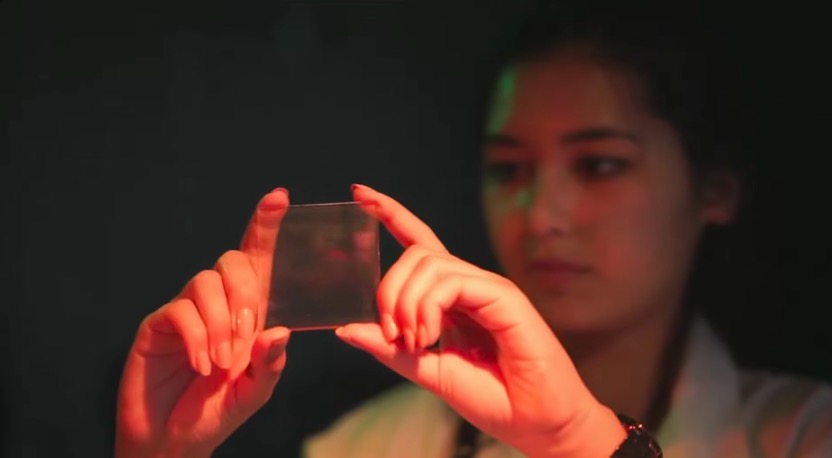
<p>Learn how to record a real reflection hologram using an educational holography kit developed by <strong>Philippe Gentet</strong> and <strong>Alaric Hamacher</strong>.</p><p>This tutorial demonstrates the complete hologram production workflow, from preparing the recording setup to exposing, developing, bleaching, and reconstructing the finished hologram. The kit was designed to make analog holography accessible to students, educators, makers, and researchers without requiring an expensive laboratory.</p><h2 id="what-you-will-learn">What You Will Learn</h2>
<ul>
<li>Principles of reflection holography</li>
<li>Required materials and equipment</li>
<li>Preparing the optical setup</li>
<li>Vibration isolation techniques</li>
<li>Exposing the holographic plate</li>
<li>Chemical development and bleaching</li>
<li>Drying and finishing the hologram</li>
<li>Reconstructing and evaluating the final result</li>
<li>Practical advice for obtaining high-quality holograms</li>
</ul>
<h2 id="educational-holography">Educational Holography</h2>
<p>The holography education kit has been developed to support practical training in analog holography and optical imaging. It enables students to gain hands-on experience with one of the most fascinating imaging technologies while understanding the underlying optical principles.</p><p>Whether you are a student, researcher, educator, or simply curious about holography, this tutorial provides a complete introduction to creating your own holograms.</p><h2 id="authors">Authors</h2>
<ul>
<li><strong>Philippe Gentet</strong></li>
<li><strong>Alaric Hamacher</strong></li>
</ul>
<p>Department of Immersive Convergence Content<br>Kwangwoon University<br>Seoul, Republic of Korea</p><h2 id="further-information">Further Information</h2>
<p>If you are interested in holography research, student projects, or graduate studies in immersive media, feel free to get in touch.</p><p>More information:</p><ul>
<li><a href="https://lab3d.kw.ac.kr">https://lab3d.kw.ac.kr</a></li>
</ul>
<hr>
<p><strong>Watch the tutorial on YouTube:</strong></p><p><a href="https://www.youtube.com/watch?v=OF0uBt6HPMs">https://www.youtube.com/watch?v=OF0uBt6HPMs</a></p>
            ]]>
        </content>
    </entry>
</feed>